Spin your DOM in z-space
zstack explodes any web page into its z-index / stacking layers and floats them in 3D — so you can finally see which thing is on top of what, and why.
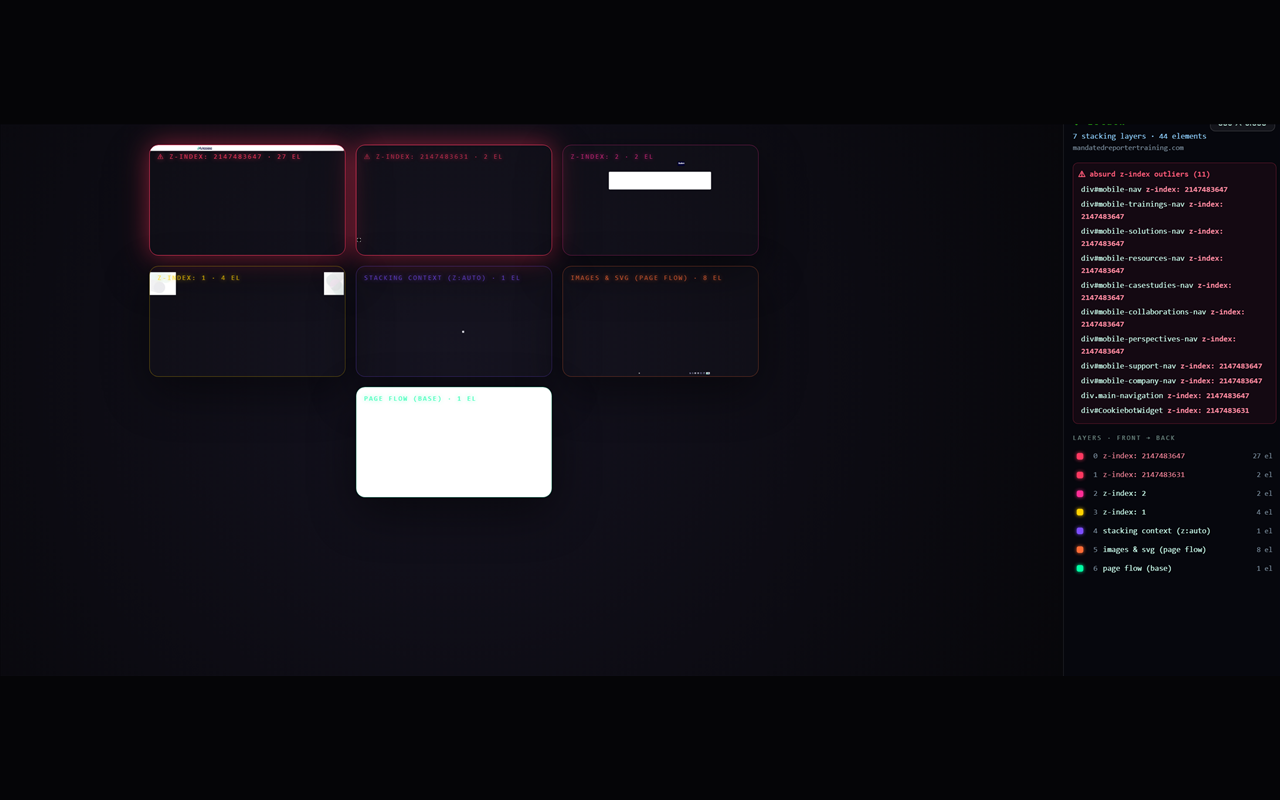
Flat DevTools can't show you a stacking bug
The menu that hides behind a banner. The modal that won't come to the front. The z-index: 999999 arms race in someone else's CSS. zstack is a forensic tool for exactly these.
What it catches
zstack flags the stacking mistakes that cause real bugs — right in a report panel next to the exploded view.
Absurd z-index values
Anything with |z-index| ≥ 100,000 is called out as a red "felony" layer. That 2147483647 you've seen? Yeah.
Silently clamped values
Browsers cap z-index at ~2.1 billion. zstack reads your original CSS and shows you where a value got quietly clamped.
z-index that does nothing
A z-index on a position: static element is ignored by the browser. zstack points it out.
Why a layer exists
Explains what created each stacking context — transform, opacity, filter, will-change, position…
Two ways to look at it
3D
The layers float in depth. Fly the camera through them, rack focus, and orbit to see the gaps between layers.
2D
The same layers laid out as a flat, scrollable grid — easier to scan at a glance. Flip between them with the V key.
Up and running in 2 minutes
The easiest way is straight from the Chrome Web Store. Prefer to load it yourself? The manual steps are below.
Download the repo
Grab the ZIP from GitHub (Code → Download ZIP) and unzip it, or clone it.
Open your extensions page
Go to chrome://extensions (or brave://extensions).
Turn on Developer mode
Flip the toggle in the top-right corner.
Load unpacked
Click Load unpacked and select the extension/ folder. Pin the zstack icon to your toolbar.
Now open any web page and click the zstack icon. Click it again (or press esc) to close. Prefer no install? Open index.html from the repo for a self-contained demo.
Controls
| Key / action | What it does |
|---|---|
| ↑ ↓ / scroll | rack focus through the layers |
| drag | orbit the stack (3D) |
| V | switch 2D / 3D view |
| L | show / hide the report panel |
| P | toggle paint / wire rendering |
| D | re-print the report to the DevTools console |
| R | snap to a 45° angle |
| 0 | reset the camera |
| esc | close (or click the toolbar icon again) |
Terms of Service
Effective July 8, 2026 · Last updated July 8, 2026
These Terms of Service ("Terms") govern your use of zstack (the "Extension") and this website. zstack is a free, open-source developer tool. By using it, you agree to these Terms.
1. Acceptance of these Terms
By installing, loading, or using the Extension, or by using this website, you confirm that you have read and agree to be bound by these Terms. If you do not agree, do not use the Extension or the website.
2. What zstack is
zstack is a browser extension for Chromium browsers (Chrome, Brave, and similar) that analyzes the currently active web page and renders its z-index / stacking layers for inspection. It is a diagnostic and educational tool intended for developers, designers, and QA engineers.
3. License
zstack is released under the MIT License. In short, you are free to use, copy, modify, merge, publish, distribute, sublicense, and/or sell copies of the software, subject to including the original copyright and license notice. The software is provided "as is". The full license text is included in the project repository and governs the software itself; where these Terms and the MIT License conflict regarding the software, the MIT License controls.
4. Acceptable use
You agree to use zstack lawfully and responsibly. You will not:
- use the Extension to access, inspect, or interfere with web pages or systems you are not authorized to access;
- use it in a way that violates the terms of service of the websites you visit or any applicable law;
- misrepresent the origin of the software, or remove or obscure its copyright and license notices;
- rely on it as the sole basis for a security, safety, or compliance decision.
zstack inspects the page you explicitly point it at. You are responsible for the pages you choose to inspect and for how you use the results.
5. No warranty
The Extension and website are provided "as is" and "as available," without warranty of any kind, express or implied, including but not limited to the implied warranties of merchantability, fitness for a particular purpose, and non-infringement. zstack renders a fast approximation of a page's stacking structure; it may be incomplete or inaccurate, and it does not replace the browser's own developer tools. We do not warrant that it will be error-free or uninterrupted.
6. Limitation of liability
To the maximum extent permitted by law, in no event shall the author(s) or copyright holders be liable for any claim, damages, or other liability — whether in an action of contract, tort, or otherwise — arising from, out of, or in connection with the Extension, the website, or the use of or other dealings in the software.
7. Changes to these Terms
We may update these Terms from time to time. When we do, we will revise the "Last updated" date above. Continued use of the Extension or website after changes take effect constitutes acceptance of the revised Terms.
8. Contact
Questions about these Terms? Email jason@growdnd.com or open an issue on the GitHub repository.
Privacy Policy
Effective July 8, 2026 · Last updated July 8, 2026
1. Scope
This Privacy Policy explains how the zstack browser extension and this website handle information. It applies to the Extension published from the zstack project and to this marketing/documentation website.
2. What we collect
Nothing. zstack does not collect, store, sell, or share any personal information or usage data. Specifically, the Extension does not:
- create user accounts or ask you to log in;
- send the content of the pages you inspect to us or anyone else;
- use analytics, telemetry, cookies, fingerprinting, or advertising identifiers;
- maintain any server or database that stores your data.
3. Browser permissions
zstack requests only the minimum permissions needed to do its job:
activeTab— grants temporary access to the current tab only when you click the zstack toolbar icon, so it can read that page's structure.scripting— lets zstack inject the overlay script that analyzes and renders the stacking layers on the page you're viewing.
zstack does not request broad host permissions and does not run in the background on pages you haven't explicitly activated it on.
4. Everything happens locally
When you click the zstack icon, the analysis and 3D/2D rendering run entirely within your browser on your device. The DOM information zstack reads is used only to build the on-screen visualization and report, and is discarded when you close the overlay. Nothing is uploaded, logged remotely, or persisted between sessions by us.
5. This website
This website is a static informational site. It does not set tracking cookies or run advertising or analytics scripts. If the site is hosted on a third-party platform (for example, a static hosting provider), that host may automatically record standard technical logs such as IP addresses and user-agent strings for security and operational purposes. We do not control, combine, or use those logs to identify or profile you.
6. Third-party services
zstack does not integrate any third-party SDKs, analytics, or advertising networks. If you choose to visit our source repository (for example, on GitHub), that third party's own privacy policy governs your interaction with it.
7. Children's privacy
zstack is a developer tool and is not directed to children. Because we collect no personal information from anyone, we likewise collect none from children.
8. Changes to this policy
If this policy changes, we will update the "Last updated" date above and post the revised version here. Because zstack collects no data, we do not expect material changes, but we will note any if they occur.
9. Contact
Questions about your privacy or this policy? Email jason@growdnd.com or open an issue on the GitHub repository.